Navigation

    SmartAPI Forum
    • Register
    • Login
    • Search
    • Categories
    • Popular
    • Groups
    • FAQs
    • API Docs

    track order by order id?

    Python SDK
    3
    5
    73
    Loading More Posts
    • Oldest to Newest
    • Newest to Oldest
    • Most Votes
    Reply
    • Reply as topic
    Log in to reply
    This topic has been deleted. Only users with topic management privileges can see it.
    • R
      rahul4019 last edited by

      Now suppose i have placed order and in return i have got an order ID.
      Now what should the payload format for getting the status of the order?
      Is there a better way to track the orders that are submitted for execution?

      S 1 Reply Last reply Reply Quote 0
      • S
        Surya 1 @rahul4019 last edited by

        @PandaTrade

        I normally check the order book every 3 seconds to track the status of the order.

        R 1 Reply Last reply Reply Quote 0
        • R
          rahul4019 @Surya 1 last edited by

          @rajanprabu hey buddy thanks. Even i have done the same.
          have you explored the order tag feature?
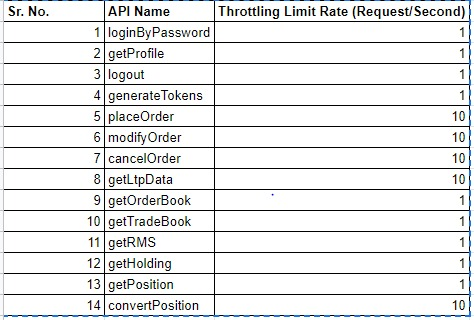
          there are some throttle limits for some API can't find that thread. do you have it handy..
          Please share if you do.

          S 1 Reply Last reply Reply Quote 0
          • S
            Surya 1 @rahul4019 last edited by

            @PandaTrade

            Here is the Access Rate limits:

            73751eb7-ce15-4053-8dd2-7f206718e526-image.png https://smartapi.angelbroking.com/assets/uploads/files/1609327272442-364058d1-0fc8-4b79-9a5e-ab99cd9d3939-image.png

            @PandaTrade said in track order by order id?:

            have you explored the order tag feature?

            Nup. I track orders with oid, so far I haven't tried this.

            1 Reply Last reply Reply Quote 0
            • A
              admin last edited by

              Hi @PandaTrade we don't have that functionality to track Oder by its order id.
              1 Reply Last reply Reply Quote 0
              • First post
                Last post