400 Bad Request Error When Placing Order with AngelOneWebView (React Native + Axios)
-
@admin I'm encountering a 400 Bad Request error when attempting to place an order through my React Native application using AngelOneWebView and Axios. I've double-checked that both the body and headers are formatted correctly, but I'm still receiving this error.
Here's a breakdown of my code:
I'm using react-native-webview to display the Angel Broking login page and capture the authorization tokens.
Once the tokens are retrieved, I use Axios to send a POST request to the https://apiconnect.angelbroking.com/rest/secure/angelbroking/order/v1/placeOrder endpoint.
The request body includes order details like variety, symbol token, transaction type, etc.
The headers contain the authorization token (Authorization: Bearer ${authToken}), content type (Content-Type: application/json), and other required headers as per Angel Broking's API documentation.Error Details:
I'm consistently getting a 400 Bad Request error in the Axios catch block.
I've logged the error details including error.response.data, error.response.status, and error.response.headers to aid debugging, but haven't been able to pinpoint the issue.
What I've Tried:I've verified that the URL, body parameters, and headers all match Angel Broking's API specifications.
I've checked the console logs for any additional error messages from Angel Broking's API.I'd greatly appreciate any insights or suggestions from the community on how to resolve this 400 Bad Request error. Has anyone else encountered similar issues when using AngelOneWebView and Axios for placing orders? Any pointers on how to troubleshoot further would be extremely helpful.
import React, { useRef, useState } from "react"; import { View, StyleSheet } from "react-native"; import WebView from "react-native-webview"; import TransactionLoading from "../Screens/TransactionLoading"; import axios from "axios"; const AngelOneWebView = () => { const webViewRef = useRef(null); const [isLoading, setIsLoading] = useState(false); const [authToken, setAuthToken] = useState(""); const [errorMessage, setErrorMessage] = useState(""); const handleNavigationStateChange = (navState) => { const url = navState.url; console.log("Current URL:", url); if ( url.includes("auth_token=") && url.includes("feed_token=") && url.includes("refresh_token=") ) { const authToken = url.split("auth_token=")[1]?.split("&")[0]; const feedToken = url.split("feed_token=")[1]?.split("&")[0]; const refreshToken = url.split("refresh_token=")[1]?.split("&")[0]; console.log("Auth Token:", authToken); console.log("Feed Token:", feedToken); console.log("Refresh Token:", refreshToken); setAuthToken(authToken); setIsLoading(true); } else if (url.includes("login_failed_indicator")) { setErrorMessage("Login failed. Please try again."); setIsLoading(true); } }; const placeOrder = () => { var data = JSON.stringify({ variety: "NORMAL", tradingsymbol: "SBIN-EQ", symboltoken: "3045", transactiontype: "BUY", exchange: "NSE", ordertype: "MARKET", producttype: "CNC", duration: "DAY", price: "", squareoff: "0", stoploss: "0", quantity: "1", }); var config = { method: "post", url: "https://apiconnect.angelbroking.com/rest/secure/angelbroking/order/v1/placeOrder", headers: { Authorization: `Bearer ${authToken}`, "Content-Type": "application/json", Accept: "application/json", "X-UserType": "USER", "X-PrivateKey": "xxxxxxx", }, data: data, }; axios(config) .then(function (response) { console.log(JSON.stringify(response.data)); }) .catch(function (error) { if (error.response) { console.log("Error Data:", error.response.data); console.log("Error Status:", error.response.status); console.log("Error Headers:", error.response.headers); } else if (error.request) { console.log("Error Request:", error.request); } else { console.log("Error Message:", error.message); } console.log("Error Config:", error.config); }); }; return ( <View style={styles.container}> {isLoading ? ( <TransactionLoading message={errorMessage || "Processing your login..."} onConfirm={placeOrder} onCancel={closeView} confirmationStage={false} /> ) : ( <WebView ref={webViewRef} source={{ uri: "https://smartapi.angelbroking.com/publisher-login?api_key=xxxxxxxx", }} onNavigationStateChange={handleNavigationStateChange} startInLoadingState style={styles.webView} /> )} </View> ); }; const styles = StyleSheet.create({ container: { flex: 1, }, webView: { flex: 1, }, }); export default AngelOneWebView; -
Hello @sahil08
Currently we don't havce the CNC product type Can you please use the product Type as DeliveryRegards,
SmartAPI Team -
@Moderator_3 Still I am gettin 400 Bad Request , even after changing producttype to DELIVERY , can you please confirm that the auth_token that I get after login in the redirected uri , i.e after logging in through this https://smartapi.angelbroking.com/publisher-login?api_key=xxx, I get a redirected to a url which has auth_token , feed_token , refresh_token in params, can I use that auth_token as Bearer token in the request header?? Please can you confirm that
-
Hello @sahil08
Yes, you can use the auth_token as Barear in header.But you request is not vaolid json so please put all the keys also in double quots ("") then try the sameRegards,
SmartAPI Team -
@Moderator_3 I have tried with all the keys also in double quots ("") in Postman , still it gives 400 Bad Request , I am attaching screenshots of my Postman request
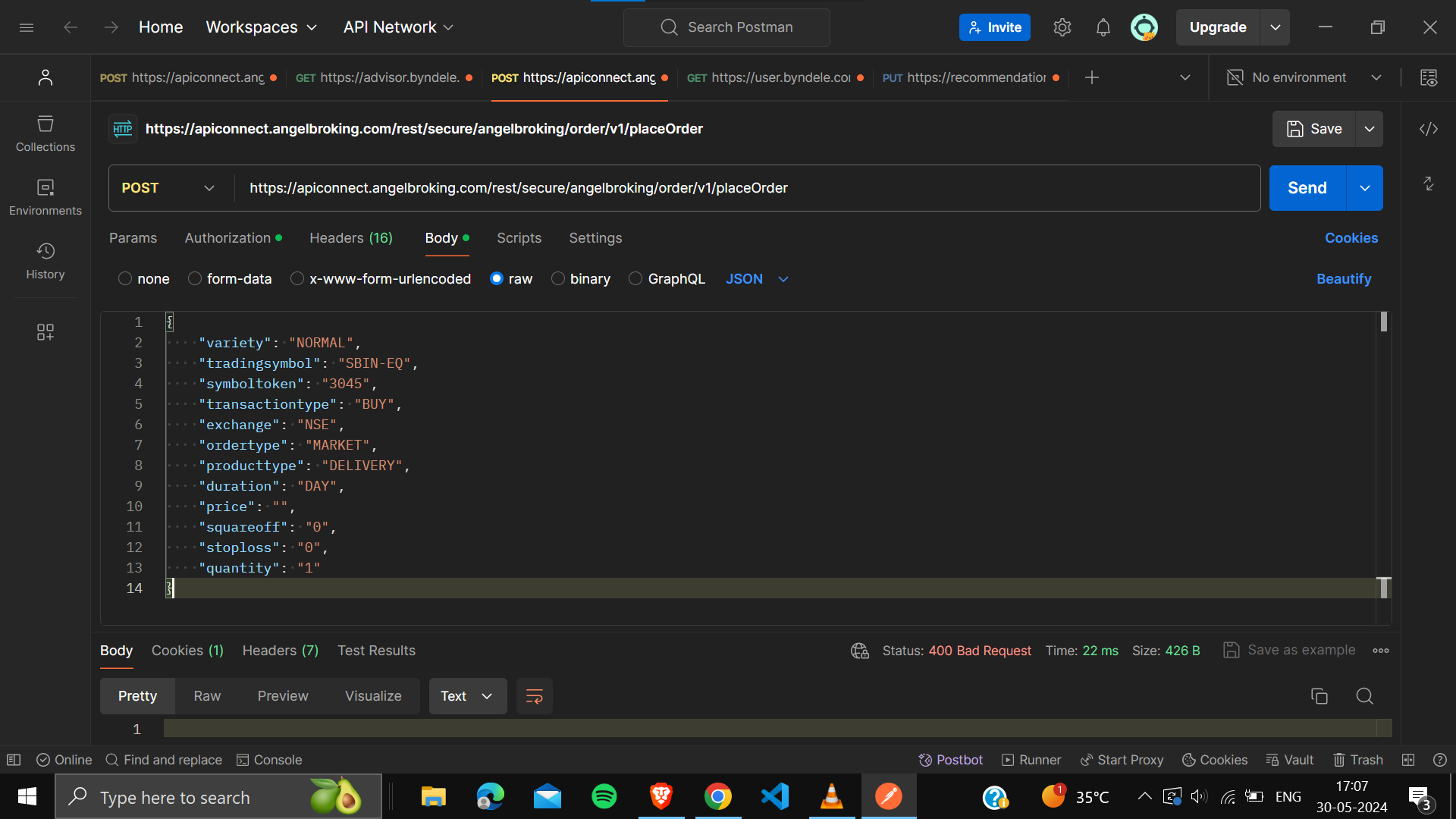
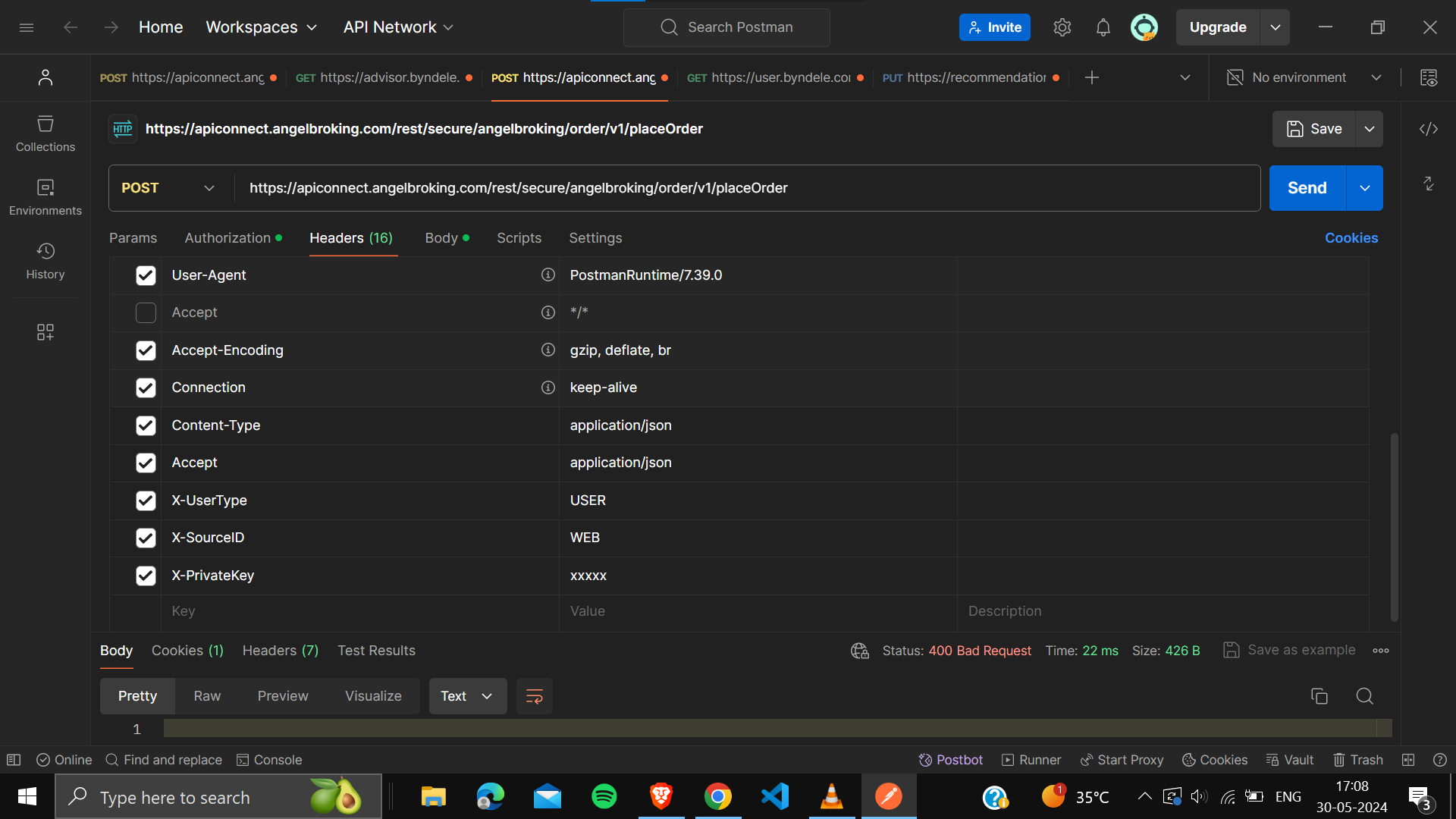
Please help me find the solution to it
-
Hello @sahil08
Can you please share the request body here so that we can have a look on that
Regards,
SmartAPI Team -
@Moderator_3 Sure
{
"variety": "NORMAL",
"tradingsymbol": "SBIN-EQ",
"symboltoken": "3045",
"transactiontype": "BUY",
"exchange": "NSE",
"ordertype": "MARKET",
"producttype": "DELIVERY",
"duration": "DAY",
"price": "",
"squareoff": "0",
"stoploss": "0",
"quantity": "1"
}This is my request body
-
@Moderator_3 This is my request body data
{
"variety": "NORMAL",
"tradingsymbol": "SBIN-EQ",
"symboltoken": "3045",
"transactiontype": "BUY",
"exchange": "NSE",
"ordertype": "MARKET",
"producttype": "DELIVERY",
"duration": "DAY",
"price": "",
"quantity": "1"
} -
@Moderator_3 Hey any update on this
-
@Moderator_3 @admin I have provided the request body , can you please check and provide me the solution
-
Hello @sahil08
Kindly check your header body Since you are not sending the mac address, client public IP and client locla Ip.
Kindly modify the header body then tryRegards,
SamartAPI Team -
@Moderator_3 Are those compulsory values to be passed in header? and I am using React Native and WebView , so X-SourceID should be Web or Mobile ?, please help me with it
-
Hello @sahil08
The value of headers should be as per the documentation as mentioned below
https://smartapi.angelbroking.com/docs/ResponseStructureRegards,
SmartAPI Team -
@Moderator_3 Can you help me to know , how do we get MACaddress and local ip for ios using React Native
-
Hello @sahil08
Open Cmd prompt and type ipconfig/all there you can see
-
Physical Address is the MAC address
-
IPv6 Address is the local ip
Regards,
SmartAPI Team -