Navigation

    SmartAPI Forum
    • Register
    • Login
    • Search
    • Categories
    • Popular
    • Groups
    • FAQs
    • API Docs

    AG8001 error, can't place order. (Can login to API, but just can't place order)

    Test
    2
    10
    47
    Loading More Posts
    • Oldest to Newest
    • Newest to Oldest
    • Most Votes
    Reply
    • Reply as topic
    Log in to reply
    This topic has been deleted. Only users with topic management privileges can see it.
    • ?
      A Former User last edited by

      When I try to place market order, I get this error:

      '{"success":false,"message":"Invalid Token","errorCode":"AG8001","data":""}'

      (Also, we don't need the price in market order, right?)

      A 2 Replies Last reply Reply Quote 0
      • A
        admin @Guest last edited by

        HI @adiknowsall Post your client id here.

        ? 1 Reply Last reply Reply Quote 0
        • ?
          A Former User @admin last edited by

          @admin S456858

          1 Reply Last reply Reply Quote 0
          • A
            admin @Guest last edited by

            HI @adiknowsall said in AG8001 error, can't place order. (Can login to API, but just can't place order):

            When I try to place market order, I get this error:
            '{"success":false,"message":"Invalid Token","errorCode":"AG8001","data":""}'
            (Also, we don't need the price in market order, right?)
            Please regenerate your tokens.

            ? 2 Replies Last reply Reply Quote 0
            • ?
              A Former User @admin last edited by

              @admin said in AG8001 error, can't place order. (Can login to API, but just can't place order):

              e regenerate your to

              As soon as I generate a new session, I am placing order. Still no success.

              1 Reply Last reply Reply Quote 0
              • ?
                A Former User @admin last edited by

                @admin https://smartapi.angelbroking.com/topic/411/working-sample-code-to-place-orders-python
                I used this code exactly, and it gives this error:
                orderResponse= self._postRequest("api.order.place", params)['data']['orderid']
                TypeError: 'NoneType' object is not subscriptable

                And when I try to manually send a request to the "placeOrder" route using POST method, the error I get is AG8001 error, INVALID TOKEN.

                A 2 Replies Last reply Reply Quote 0
                • A
                  admin @Guest last edited by admin

                  HI @adiknowsall

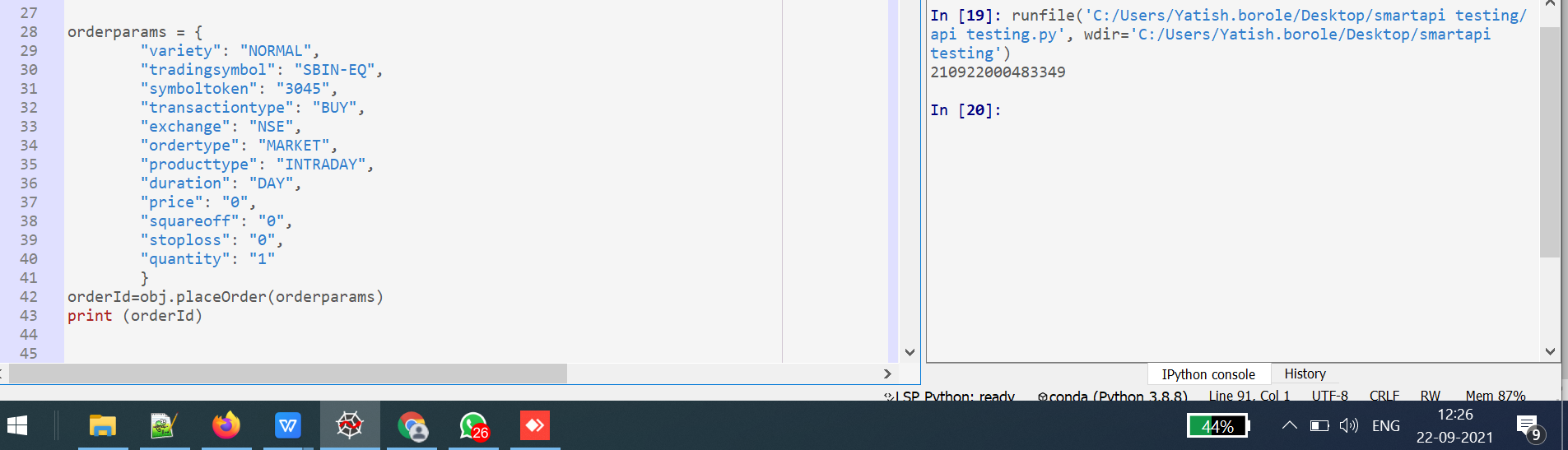
                  05c87a12-0613-411f-9f76-6b0a0e32fc00-image.png ![alt text](![image url]([image url](link url)))

                  1 Reply Last reply Reply Quote 0
                  • A
                    admin @Guest last edited by

                    HI @adiknowsall said in AG8001 error, can't place order. (Can login to API, but just can't place order):

                    @admin https://smartapi.angelbroking.com/topic/411/working-sample-code-to-place-orders-python
                    I used this code exactly, and it gives this error:
                    orderResponse= self._postRequest("api.order.place", params)['data']['orderid']
                    TypeError: 'NoneType' object is not subscriptable
                    And when I try to manually send a request to the "placeOrder" route using POST method, the error I get is AG8001 error, INVALID TOKEN.

                    Its seems to be working fine from our end kindly go through the req response and the order id generated from our code.

                    ? 1 Reply Last reply Reply Quote 0
                    • ?
                      A Former User @admin last edited by

                      @admin Thanks for your response. It works now! It was a small error from my side.

                      A 1 Reply Last reply Reply Quote 0
                      • A
                        admin @Guest last edited by

                        Hi @adiknowsall :+1:

                        1 Reply Last reply Reply Quote 0
                        • First post
                          Last post